

Airveek field guide
Necklace Jewelry Clean Listing Product Photo: Keep the Pendant Accurate
Start with the supplied simple pendant necklace as the identity reference and, for the demo treatment, add the supplied logo reference second. Build one product-first square scene: keep the round pendant, fine chain, clasp, and warm metal color unchanged against a quiet neutral background. Leave room for mobile cropping, check full size and thumbnail size, and reserve worn and clasp views for supporting images.
Search task: necklace jewelry clean listing product photo
Written by LIKA
The buyer question
How do I create a clean listing image for this necklace jewelry while keeping the product identity accurate?
Your starting product
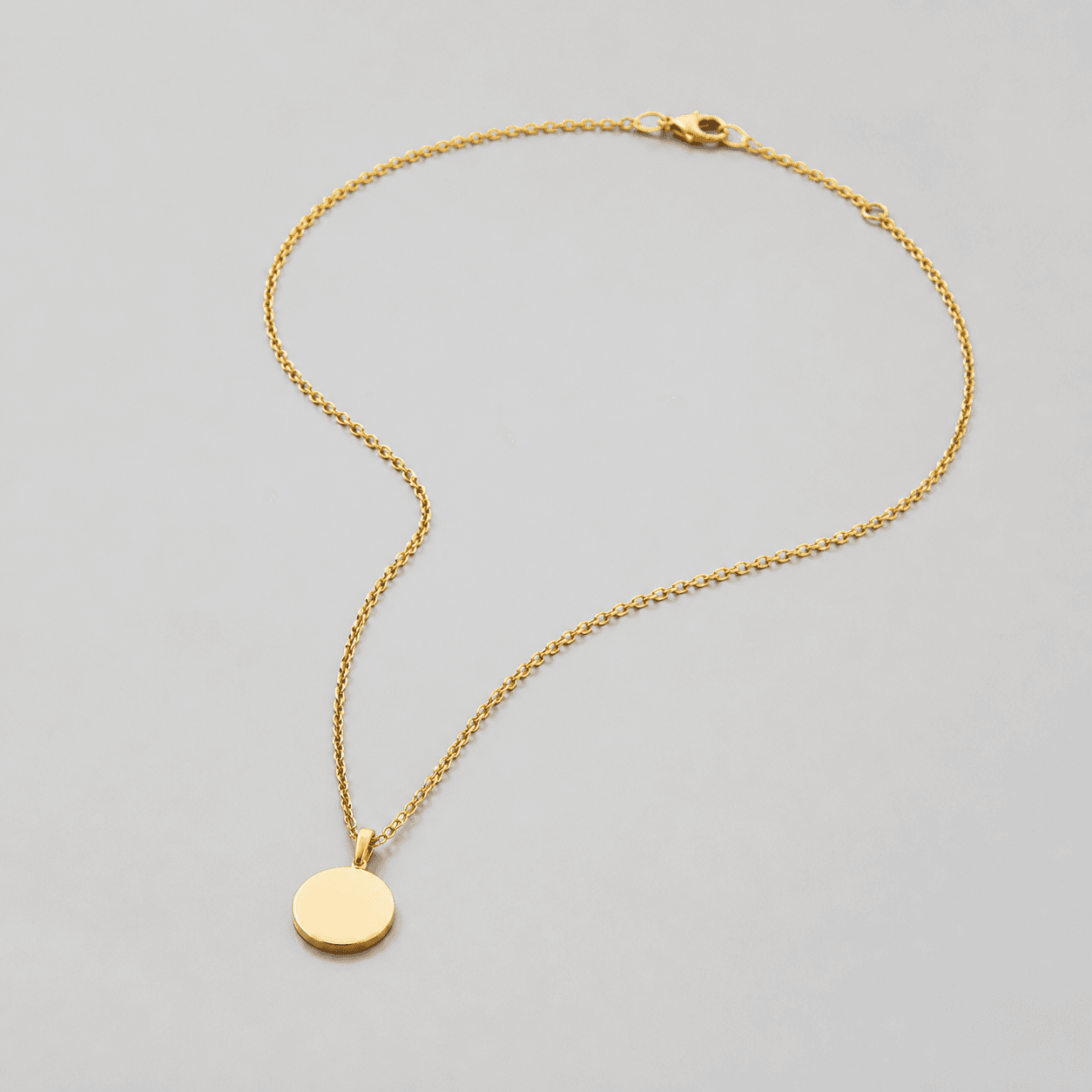
Start with a clear photo that shows the full product and the details shoppers need to see. Keep this reference nearby while you generate, compare, and refine each image.
Quick setup
- Goal
- ecommerce product-page main image with supporting gallery views
- Output
- 1024 × 1024 saved composition reference, 1500 × 1500 or larger for a new export when available
- Goal
- store-listing
- Mode
- product-scene
- Scene
- studio
- framing
- Keep the necklace about 75–90% of the image area while preserving the complete chain, clasp, and pendant.
- lighting
- soft directional commercial light with controlled reflections
- aspectRatio
- 1:1 square
Example Airveek result

How to create it
1. Add the product and logo references
Upload the supplied necklace reference first, then add the supplied morrow logo reference second. Keep the identity anchors visible: one round pendant, one fine chain, one clasp, and the original warm metal color.
2. Set the clean listing workflow
Choose Mode: product-scene, Scene: studio, and Goal: store-listing. Keep this job focused on fast whole-product identification; save worn context for the lifestyle sibling and clasp inspection for the detail sibling.
3. Build the product-first frame
Use a quiet neutral background and soft directional light with controlled reflections. Center the complete necklace, keep the chain path and clasp traceable, make the pendant crisp, and leave enough margin for a square crop and a 240 × 240 mobile thumbnail.
4. Review identity and export
Compare the result with the supplied source at full size and thumbnail size. Check the round pendant, complete chain, clasp, warm metal color, and exact supplied mark when shown. Keep the largest clean original available; the saved ECO20 reference is 1024 × 1024, so do not enlarge it.
Tested prompt
Use the supplied simple pendant necklace image as the identity reference and the supplied fictional morrow logo reference as the second input. Keep the exact lowercase wordmark "morrow" and its two sparkle stars together as the only brand mark; place them naturally on a small jewelry card, package, or product surface only if shown, and add no other readable words. Create one clean listing photo for one simple pendant necklace. Keep the exact round pendant, fine chain, clasp, and warm metal color unchanged. Use a quiet neutral commercial studio background, soft directional light with controlled reflections, and a product-first square composition with the necklace filling roughly 75–90% of the frame while retaining complete chain, clasp, and pendant visibility. Keep the product sharp, centered, and easy to inspect at a 240 × 240 thumbnail. Do not add a worn model, extra jewelry, duplicate necklace, invented dimensions, materials, features, claims, watermarks, retailer marks, borders, text overlays, or promotional copy.Recorded settings
- Goal
- store-listing
- Mode
- product-scene
- Scene
- studio
- framing
- Keep the necklace about 75–90% of the image area while preserving the complete chain, clasp, and pendant.
- lighting
- soft directional commercial light with controlled reflections
- aspectRatio
- 1:1 square
Common problems and fixes
Problem: One output combines the clean necklace, worn neckline, and clasp close-up into a collage, so the main product is no longer a focused listing image.
Fix: Run a separate studio/store-listing job for one complete necklace on a quiet neutral background. Keep the worn view for scale and the clasp close-up for the supporting detail image.
Problem: The pendant is small, the chain or clasp reaches the crop edge, or the necklace disappears at mobile thumbnail size.
Fix: Center the complete necklace, use the 75–90% framing target as a guide, preserve square-safe margin, simplify the background, and check the 240 × 240 thumbnail before export.
Problem: The pendant silhouette, chain path, clasp, or warm metal color drifts from the supplied reference.
Fix: Restate the four visible identity anchors in the prompt, compare the output with the source at full size and thumbnail size, and rerun before selecting the image.
Problem: The supplied mark is distorted or extra readable words appear on a jewelry card, package, or product surface.
Fix: Add the supplied logo reference as the second input, preserve the exact lowercase morrow wordmark with both sparkle stars together, and remove every other readable brand or promotional element.
What to double-check
- The supplied reference visibly shows one round pendant, a fine chain, a clasp, and a warm metal color. Verify material, exact measurements, chain length, closure behavior, care details, and other specifications from the product information for the item being sold.
- The available ECO20 recording is one combined three-result capture without the supplied morrow logo input. Its clean full-necklace result is a composition reference; run the current prompt with both supplied references before using a branded output.
- The saved composition reference is 1024 × 1024. For a new export, keep the largest full-size original available and confirm the destination's current image requirements before resizing or placing it.
- Use a separate worn view for relative scale and a separate close view for the pendant and clasp. A clean listing frame should not try to answer all three jobs at once.
Why this works
A clean listing frame first answers what is being sold. This source has one round pendant, a fine chain, and a clasp; keeping all three connected and visible prevents the chain from reading as a generic line. A quiet neutral background and soft controlled light preserve edge and warm metal detail. Separate worn and close views can then handle scale and hardware without shrinking the hero.
Before you export
- Compare the round pendant, fine chain, clasp, warm metal color, and overall necklace silhouette with the supplied source.
- Keep the necklace complete, centered, sharp, and large enough to read while retaining safe margin for a square crop.
- Use soft directional light and controlled reflections so the chain links, clasp, pendant edge, and finish do not disappear into the background.
- Preserve the exact lowercase morrow wordmark and both sparkle stars together when the supplied mark is shown; add no other readable brand copy.
- Check the full-size result and a 240 × 240 thumbnail, then export from the largest clean original rather than enlarging a thumbnail.
- Keep worn scale in the lifestyle image and pendant or clasp inspection in the detail image; use this frame for whole-product listing identification.
Common questions
What should the main necklace listing photo show?
Show one complete necklace clearly: the round pendant, the full chain path, and the clasp should remain visible on a quiet neutral background. Keep the product dominant and use additional views for worn scale or close hardware inspection. This lets the main image identify the item quickly without turning it into a collage.
Should I use a worn necklace photo as the main listing image?
For this clean listing workflow, use the product-only frame as the main image and place the worn neckline view in the supporting gallery. The worn view is useful for context and relative scale, but the complete necklace is easier to identify when the product is alone and unobscured.
How can I show necklace scale without changing the product identity?
Keep the clean listing image focused on the supplied necklace, then use a separate restrained worn view to show how it sits in context. Treat that view as a relative scale cue only: confirm exact pendant size, chain length, material, and care details from the product information for the item being sold.
What size should I export for a necklace product photo?
Keep the largest clean full-size original available and do not enlarge a thumbnail. Google currently recommends 1500 × 1500 pixels or above for best performance in listing formats; the saved ECO20 composition reference is 1024 × 1024, so use it as a visual reference and confirm the destination's current requirements before a new export.
Further reading
- Marketplace/category reference for simple pendant necklaces — Amazon marketplace reference
- Image link [image_link] - Google Merchant Center Help — Google Merchant Center Help
- The Complete Guide to Ecommerce Photography — Shopify