

Airveek field guide
Necklace Jewelry Product Photo Prompt for Airveek
Use the supplied simple pendant necklace as the identity reference and the supplied morrow logo as the second input. Run three labeled Airveek blocks: a square studio listing to identify the full pendant and chain, a restrained worn view for relative scale and drape, and a close detail view for the clasp and pendant connection. Keep the warm metal color unchanged, then review full size and at 240 × 240 before export.
Search task: necklace jewelry product photo prompt
Written by LIKA
The buyer question
What tested Airveek prompt can I use to create a consistent necklace jewelry product-photo set?
Your starting product
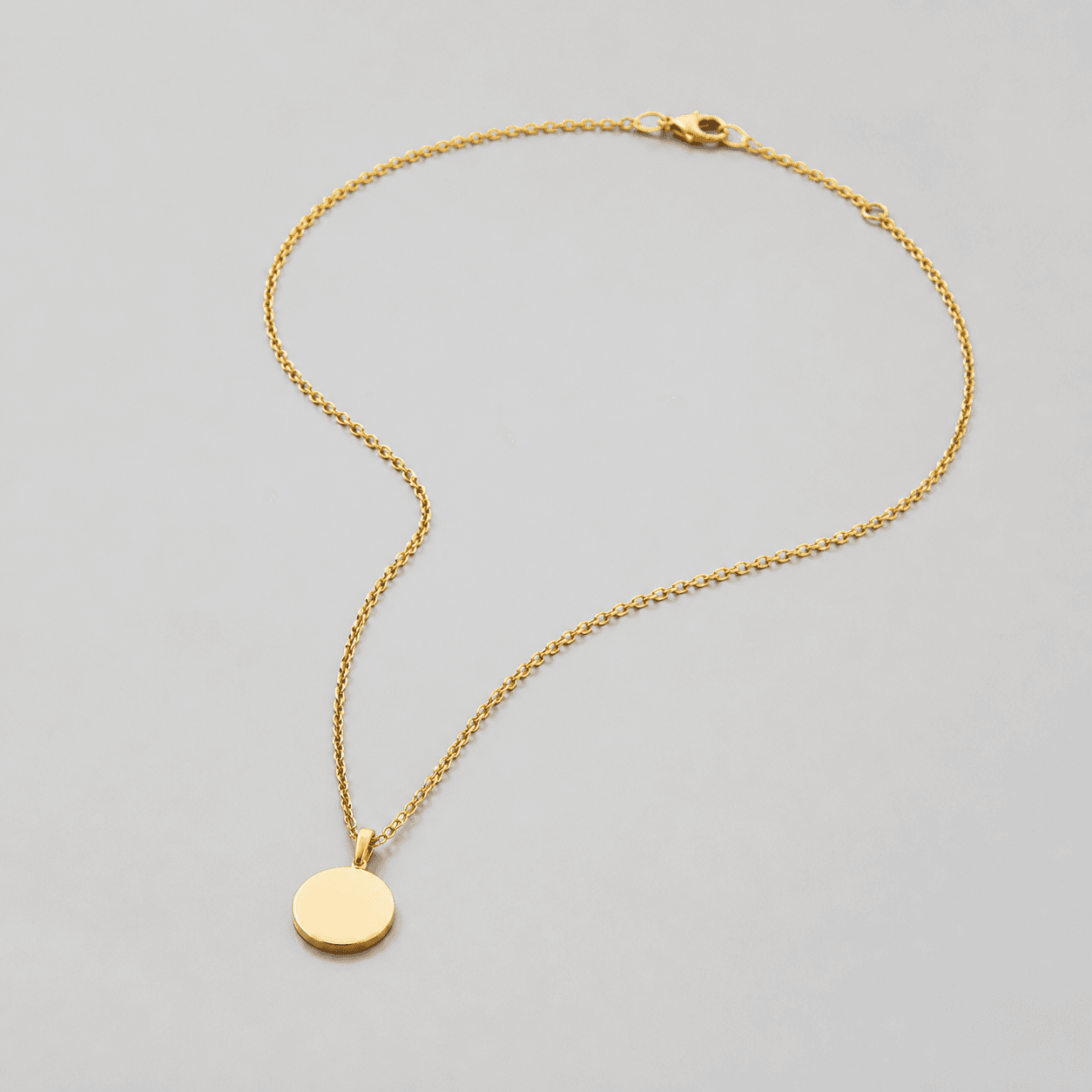
Start with a clear photo that shows the full product and the details shoppers need to see. Keep this reference nearby while you generate, compare, and refine each image.
Quick setup
- Goal
- Ecommerce product-photo prompt and creator preset
- Output
- 1:1 square-safe master for listing and detail, Destination-specific worn-scale crop where the placement supports it, 240 × 240 mobile-thumbnail check, Largest clean export before destination-specific resizing
- detail
- [object Object]
- framing
- Keep the complete necklace visible in the listing view, use a closer worn crop for relative scale, and reserve the tightest crop for the clasp and pendant connection.
- listing
- [object Object]
- baseline
- [object Object]
- lighting
- Soft diffused commercial light with controlled reflections
- lifestyle
- [object Object]
- aspectRatio
- 1:1 square-safe master for the listing and detail views; destination-specific crop for the worn view
Example Airveek result

How to create it
1. Add the identity references
Upload the supplied necklace image first and the supplied morrow logo reference second. Use the necklace to preserve the round pendant, fine chain, clasp, and warm metal color; use the logo only for the exact lowercase morrow wordmark and its two sparkle stars.
2. Set the product-photo workflow
Open Airveek's product-fashion creator and start from the recorded ECO20 baseline: Mode product-scene, Scene studio, and Goal store-listing. Keep the same source identity while switching the scene and goal only when running the worn-scale block.
3. Run the listing block
Use the listing block for whole-necklace identification. Keep the pendant, complete chain path, and clasp sharp against a quiet background, with square-safe margin and enough subject scale for a 240 × 240 thumbnail.
4. Run the worn-scale block
Run the lifestyle block as a separate job with Scene lifestyle and Goal social-post. Let the neutral neckline show relative scale and drape, while keeping the pendant and chain unobscured and easy to crop.
5. Run the pendant-and-clasp block
Run the detail block as a separate studio job. Use controlled reflections, a clean edge around the pendant, and enough chain context to make the clasp and pendant connection readable without changing the product geometry.
6. Review the set before export
Compare every result with the supplied necklace reference at full size, in the intended crop, and at 240 × 240. Confirm the same pendant shape, chain path, clasp, warm metal color, crop safety, and exact supplied mark before choosing the cleanest masters.
7. Export for the destination
Keep the largest clean original available, retain a square master for listing and detail, and make a destination-specific worn crop only after checking the destination's current format, pixel, and file-size requirements.
Tested prompt
Use the supplied simple pendant necklace image as the identity reference and the supplied fictional demo-brand logo reference as the second input. Keep the exact lowercase wordmark "morrow" with its two sparkle stars together as the only brand mark when branding is shown on the product or package; add no other readable text. Run each block below as a separate Airveek generation job, keeping the same necklace identity across all three jobs.

LISTING BLOCK
Create one clean ecommerce listing photo for one simple pendant necklace on a quiet neutral studio background. Preserve the exact visible round pendant, fine chain, clasp, and warm metal color. Keep the complete necklace dominant and sharp, trace the chain path, include the clasp, and leave square-safe margin for a centered crop and a 240 × 240 mobile check. When branding is shown, place only the exact lowercase wordmark "morrow" with its two sparkle stars together on a product surface, jewelry card, or package. Do not add other readable text, dimensions, materials, claims, extra jewelry, duplicate necklaces, watermarks, retailer marks, or promotional overlays.

LIFESTYLE BLOCK
Create one premium ecommerce lifestyle photo of the same simple pendant necklace worn on a restrained neutral neckline. Preserve the exact visible round pendant, fine chain, clasp, and warm metal color. Let the neckline provide a relative scale and drape cue without becoming a second hero; keep the pendant and chain unobscured and leave a mobile-safe crop around the pendant. Use soft diffused light and restrained styling. When branding is shown, use only the exact lowercase wordmark "morrow" with its two sparkle stars together on the product or package. Do not add other readable text, dimensions, materials, claims, extra jewelry, duplicate necklaces, watermarks, retailer marks, or promotional overlays.

DETAIL BLOCK
Create one close ecommerce detail photo of the same simple pendant necklace showing the pendant, chain-to-pendant connection, and clasp at inspection scale. Preserve the exact visible geometry and warm metal color. Use soft diffused commercial light with controlled reflections, keep a short visible chain path so the close crop remains connected to the full product, and leave enough margin for a square crop. When branding is shown, use only the exact lowercase wordmark "morrow" with its two sparkle stars together on the product or package. Do not invent dimensions, materials, features, claims, extra jewelry, duplicate necklaces, watermarks, retailer marks, or promotional overlays.Recorded settings
- detail
- [object Object]
- framing
- Keep the complete necklace visible in the listing view, use a closer worn crop for relative scale, and reserve the tightest crop for the clasp and pendant connection.
- listing
- [object Object]
- baseline
- [object Object]
- lighting
- Soft diffused commercial light with controlled reflections
- lifestyle
- [object Object]
- aspectRatio
- 1:1 square-safe master for the listing and detail views; destination-specific crop for the worn view
Common problems and fixes
Problem: The necklace disappears or the chain becomes too thin at mobile size.
Fix: Reduce empty space and competing props, keep the complete pendant and chain inside the safe crop, simplify the background, and retest at 240 × 240 before export.
Problem: The warm metal surface turns into glare or loses its edge.
Fix: Use broad diffusion, gentle fill, and a quieter reflection path; move direct light out of the metal's reflected view and compare against the supplied source.
Problem: The worn scene shows styling but not how the pendant sits.
Fix: Reduce neckline and prop contrast, center the pendant in the crop, keep the chain visible, and reserve the tightest inspection for the separate detail block.
Problem: The prompt creates a distorted mark or adds extra readable words.
Fix: Add the supplied logo reference as the second input, preserve the exact lowercase morrow wordmark with both sparkle stars together, and remove every other readable brand or promotional element before selecting a result.
What we rejected or corrected


What to double-check
- The supplied reference visibly establishes one round pendant, a fine chain, a clasp, and a warm metal color. Verify exact chain length, pendant dimensions, composition, finish, care, fit, and other specifications from the product information for the item being sold.
- A worn neckline view provides a relative scale and drape cue, but it is not a ruler and cannot verify exact measurements or fit.
- The available ECO20 recording is one combined three-result capture and did not include the supplied morrow logo reference. Use it as a composition reference; run the current prompt with both supplied inputs before using a branded output.
- The saved composition reference is 1024 × 1024. Keep the largest clean original for a new run and confirm the destination's current image requirements before resizing.
- A close crop can make visible chain, pendant, and clasp details easier to inspect, but it cannot establish unshown material, durability, comfort, or performance claims.
Why this works
A necklace set is clearer when each frame answers one shopping question. The listing block establishes the complete pendant and chain, the worn block adds relative scale and drape, and the detail block enlarges the clasp and pendant connection. Repeating the same visible identity anchors and supplied mark keeps the set coherent, while separate crops stop styling from hiding the small hardware.
Before you export
- Compare every result with the supplied necklace reference and preserve the round pendant, fine chain, clasp, and warm metal color.
- Keep the complete necklace easy to identify in the listing view and preserve a square-safe crop with useful margin for a mobile thumbnail.
- Use the worn view for relative scale and drape while keeping the pendant and chain unobscured.
- Reserve the close view for the pendant connection and clasp, using soft diffusion and controlled reflections so small hardware remains readable.
- When branding is shown, use only the supplied exact lowercase morrow wordmark with its two sparkle stars and no other readable brand text.
- Inspect full-size, intended-crop, and 240 × 240 versions for product identity, detail visibility, crop safety, and mark legibility.
- Keep exact measurements, composition, care, comfort, fit, durability, and performance claims tied to verified product information.
Common questions
Why use three prompt blocks for one necklace?
Each block answers a different shopper question. The listing frame identifies the complete necklace, the worn frame adds relative scale and drape, and the detail frame enlarges the pendant connection and clasp. Running them separately keeps the product large enough to inspect and makes the set easier to compare.
How do I keep the necklace consistent across all three jobs?
Upload the same supplied necklace reference each time, repeat the visible identity anchors, and change only the scene, crop, and buyer task. Compare the round pendant, chain path, clasp, warm metal color, and mark before choosing a result.
Should the worn necklace view replace the clean listing view?
Keep the clean product-first frame for fast identification and use the worn neckline as a supporting view for relative scale and drape. A model or neckline can add context, but the full necklace is easier to identify when it remains alone and unobscured in the listing job.
Can a necklace photo prove exact chain length, material, or fit?
No. The worn view can show relative scale and drape, and the close view can make visible hardware easier to inspect, but an image cannot establish exact measurements, material composition, durability, comfort, or fit for every wearer. Verify those details in the product information.
How do I keep a fine chain readable on mobile?
Use a quiet background, controlled reflections, enough subject scale, and a crop-safe chain path. Check the clean and worn views at 240 × 240, then reserve the tightest crop for the clasp and pendant connection instead of shrinking every detail into one frame.
Further reading
- Airveek: All-in-One AI Image Generator — Airveek
- Image link [image_link] - Google Merchant Center Help — Google Merchant Center Help
- Best practices for advertising clothing and accessories — Google Merchant Center Help
- Additional image link [additional_image_link] - Google Merchant Center Help — Google Merchant Center Help
- Image SEO Best Practices — Google Search Central
- The Complete Guide to Ecommerce Photography — Shopify
- Taking product photographs — Shopify Help Center
- Public discussion about jewelry photography and online buying questions — Reddit r/jewelrylove
- Marketplace/category reference for simple pendant necklaces — Amazon marketplace reference