

Airveek field guide
How to Create a Clean Adjustable Desk Lamp Listing Image in Airveek
Use the supplied adjustable warm-light desk lamp as the identity anchor, choose Airveek's product-scene studio listing setup, and ask for one square hero with the full black articulated silhouette, round base, shade, stem, and hinge joints visible. Keep the lamp product-dominant on a neutral background, preserve the warm-lit interior, and inspect a 240x240 thumbnail before exporting. Keep dimensions and electrical claims out of the image unless verified separately.
Search task: desk lamp clean listing product photo
Written by LIKA
The buyer question
How do I create a clean listing image for this desk lamp while keeping the product identity accurate?
Quick setup
- Goal
- Ecommerce listing and marketplace main product image
- Output
- 1024x1024 square working master, 240x240 mobile-thumbnail check
- Goal
- store-listing
- Mode
- product-scene
- Scene
- studio
Example Airveek result
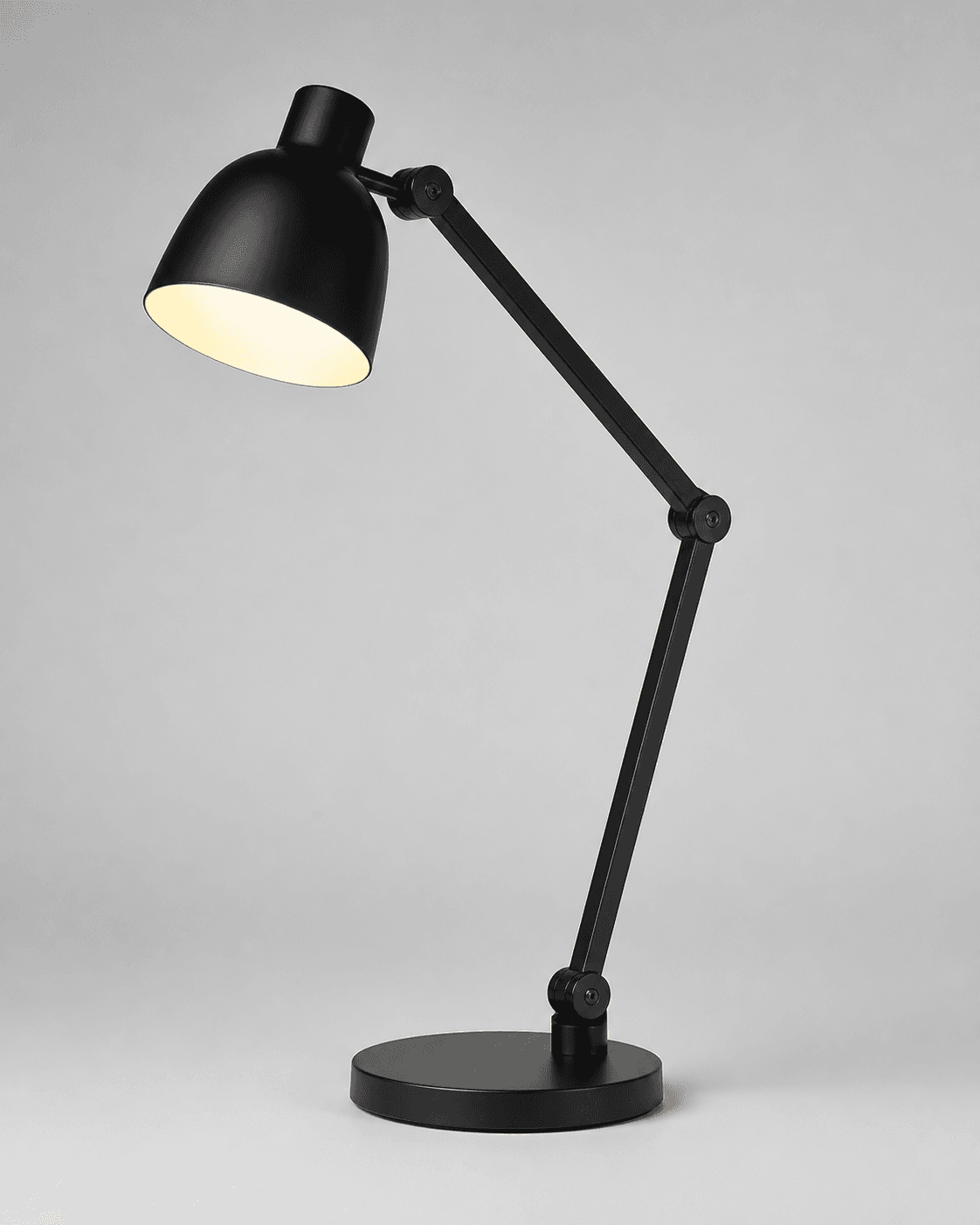
How to create it
1. Add the supplied references
Use the desk-lamp reference as the identity anchor. For the fictional morrow demo version, add the supplied logo PNG as the second input so the exact lowercase wordmark and both sparkle stars can be placed naturally on the product or a small package element.
2. Choose the listing setup
In Airveek, select Mode: product-scene, Scene: studio, and Goal: store-listing. This is the observed ECO10 setup; keep the listing job focused on one complete lamp rather than a desk scene or a close-up.
3. Build the clean hero frame
Use a neutral commercial background and a centered three-quarter view. Keep the lamp large enough to identify quickly while leaving breathing room around the silhouette so the round base, shade, stem, hinge joints, and visible control area survive a square crop.
4. Shape light for readable detail
Keep the warm-lit interior visible as a restrained cue, then use soft side light or gentle fill to separate the black stem, hinges, controls, and base from the background. Preserve the shade edge instead of letting the glow become a bright hotspot.
5. Review the crop and export
Compare the candidate with the supplied lamp at full size and at a 240x240 mobile thumbnail. Confirm the complete product, visible controls, logo treatment when used, and clean background remain clear, then export the 1024x1024 working master and check the destination's current image requirements.
Tested prompt
Use the supplied adjustable warm-light desk-lamp reference as the first input. For the fictional demo version, use the supplied morrow logo reference as the second input and apply the exact lowercase wordmark "morrow" with its two sparkle stars naturally to the lamp surface or a small package element; add no other readable brand text. Create one clean listing product photo for one desk lamp. Keep the exact black articulated geometry, proportions, round base, stem, rounded shade, three visible hinge joints, warm-lit interior, and visible control area unchanged. Use a neutral commercial studio background, a centered three-quarter product-dominant composition, enough breathing room for square and mobile crops, and crisp detail on the base, shade edge, stem, hinges, and controls. Do not invent dimensions, wattage, color temperature, adjustment range, features, claims, extra products, watermarks, retailer logos, promotional overlays, or additional readable text.Recorded settings
- Goal
- store-listing
- Mode
- product-scene
- Scene
- studio
Common problems and fixes
Problem: The warm-lit shade becomes a hotspot and the black body disappears.
Fix: Reduce the glow's visual intensity, keep soft fill on the lamp body, and recheck the shade edge, hinges, control area, stem, and base at thumbnail size.
Problem: The lamp becomes too small or a crop trims the base or shade.
Fix: Use a centered product-dominant composition, pull back only enough to preserve the full silhouette, and review the square frame at 240x240 before export.
Problem: A generated frame changes the hinge geometry, controls, color, or proportions.
Fix: Compare the selected frame against the supplied lamp reference and regenerate with stronger identity-preservation language before using it.
Problem: The fictional demo mark changes shape or new readable copy appears.
Fix: Use the supplied logo reference as the second input, preserve the exact lowercase morrow wordmark and both sparkle stars, and remove every other readable mark.
What to double-check
- The available ECO10 recording proves the product-fashion route and listing settings, but its three saved studio variations were made without the supplied logo input. Run the branded demo version again before presenting a morrow-marked result as final.
- Keep this clean listing frame focused on identification. Use the lifestyle sibling for desk context and scale, and the detail sibling for close hinge and control inspection.
Why this works
A clean listing image has one job: let a shopper identify the exact lamp quickly. The complete black silhouette, round base, shade, stem, hinge joints, and visible controls carry that job; the restrained background protects recognition, while the warm-lit interior adds direction without turning the image into a lifestyle scene.
Before you export
- The full black articulated lamp, round base, stem, rounded shade, hinge joints, and visible control area match the supplied reference.
- The shade edge and warm-lit interior remain visible while soft side light keeps the black body, hinges, controls, and base readable.
- The complete silhouette has breathing room and remains easy to identify at full size and at a 240x240 mobile thumbnail.
- When the fictional demo brand is used, the only mark is the supplied exact lowercase morrow wordmark with both sparkle stars and no other readable brand text.
Common questions
What should a clean listing image show for an adjustable desk lamp?
Show one complete lamp with the round base, stem, shade, hinge joints, and visible control area easy to find. Keep the warm-lit interior restrained so it adds a directional cue without obscuring the black body or changing the product's visible identity.
Should the main desk lamp image use a desk scene?
Keep the main listing frame clean and product-dominant so the shopper can identify the lamp quickly. Use a separate lifestyle frame for desk context, relative scale, and light direction, and keep a close detail frame for the hinge and control area.
How do I show the lamp lit without losing its shape?
Use the warm-lit interior as a restrained visual cue, protect the shade edge, and add soft side light or gentle fill to keep the black stem, hinges, controls, and base readable. Creator discussions treat lit-lamp exposure as a lighting balance, not as evidence of this lamp's brightness.
Can this product photo prove the lamp's brightness or exact dimensions?
No. The image can show visible shape, placement, and light direction, but brightness, wattage, color temperature, dimensions, adjustment range, electrical safety, and included parts should come from the actual product information rather than from visual inference.
How should I use the morrow mark in the fictional demo version?
Add the supplied logo reference as the second input and preserve the exact lowercase morrow wordmark with both sparkle stars on the lamp surface or a small package element. Keep every other readable brand mark and promotional overlay out of the frame; if a destination requires a cleaner main image, use the unmarked version for that slot.
Further reading
- Image SEO Best Practices — Google Search Central
- Image link [image_link] - Google Merchant Center Help — Google Merchant Center Help
- The Complete Guide to Ecommerce Photography — Shopify
- Airveek: All-in-One AI Image Generator — Airveek
- How to photograph a light source, turned on? (table lamp) — Reddit r/productphotography community discussion
- How can I improve my product photos to a professional level? — Reddit r/productphotography community discussion
- Marketplace/category reference — Amazon marketplace reference