

Airveek field guide
Desk Lamp Product Photo Prompt: Build a Consistent Airveek Set
The recorded Airveek core prompt is a useful starting point: ask for a clear full-product listing, a restrained desk scene, and a close hinge-and-control view while preserving the lamp's exact shape. For the fictional morrow version, add the supplied logo as a second reference and keep the lowercase wordmark with two sparkle stars unchanged. Run the three blocks separately, then check crops at full size and 240×240.
Search task: desk lamp product photo prompt
Written by LIKA
The buyer question
What tested Airveek prompt can I use to create a consistent desk lamp product-photo set?
Quick setup
- Goal
- Owned-site product page and supporting ecommerce creative
- Output
- 1024x1024, 240x240 mobile-thumbnail check
- detail
- Mode: product-scene · Scene: studio · Goal: store-listing
- listing
- Mode: product-scene · Scene: studio · Goal: store-listing
- lifestyle
- Mode: product-scene · Scene: lifestyle · Goal: social-post
Example Airveek result
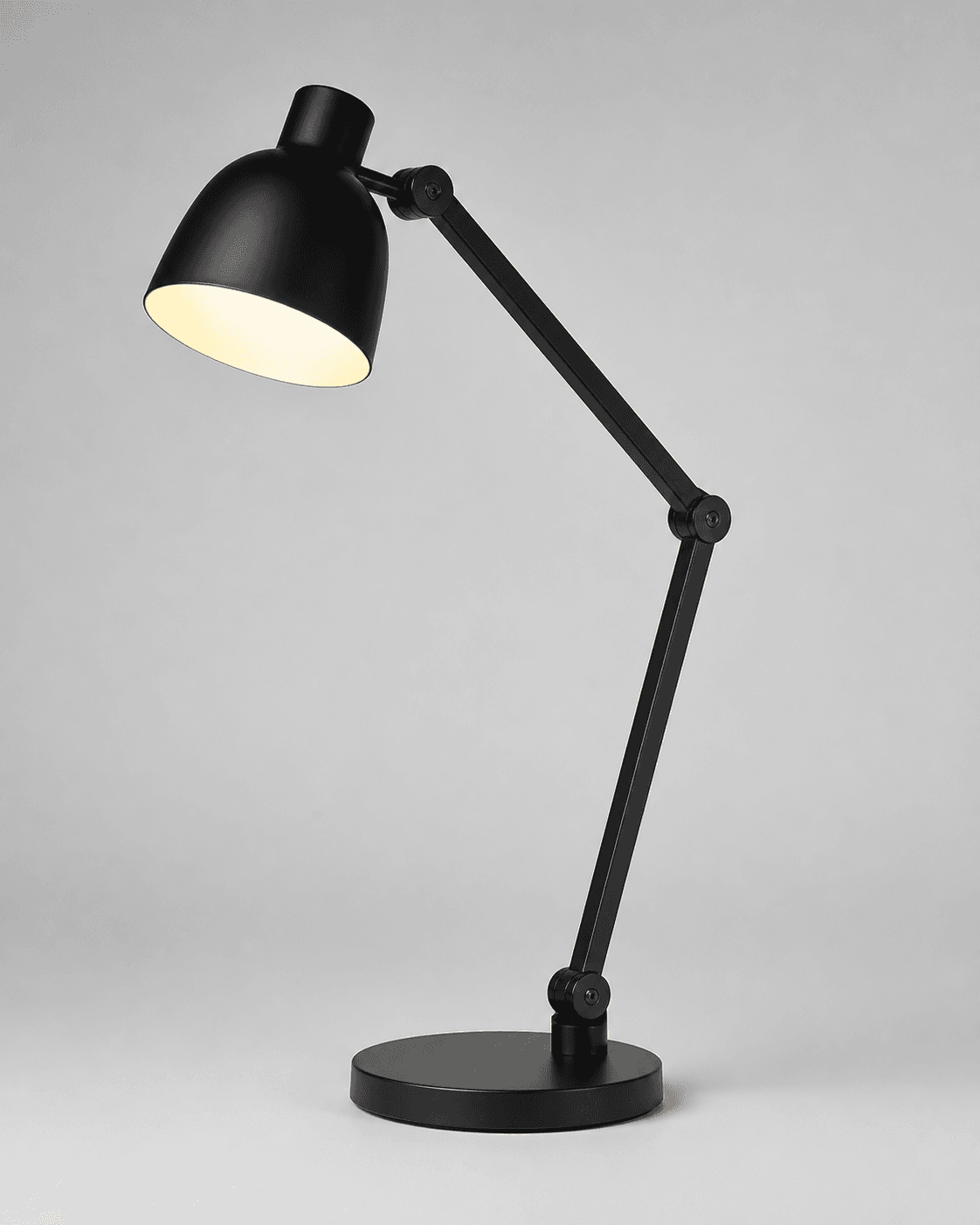
How to create it
1. Add the two supplied references
Upload the adjustable desk-lamp source as the identity anchor. For the fictional demo version, add the supplied logo reference as the second input so the exact lowercase morrow wordmark and both sparkle stars can be placed naturally without inventing another mark.
2. Choose one job at a time
In Airveek's product-fashion creator, use the recorded starting controls for the product-first listing: Mode: product-scene, Scene: studio, and Goal: store-listing. Then run the lifestyle and detail blocks separately with their job-specific settings instead of using one shared set of variations for every purpose.
3. Keep the lamp identity fixed
Repeat the same source and logo references and keep the black articulated shape, round base, stem, shade, hinge joints, visible control area, warm-lit interior, materials, and color unchanged. Change only the scene, light direction, and crop that belong to the job.
4. Give each image one buyer job
Use the listing block to identify the complete lamp, the lifestyle block to show desk use, relative scale, and light direction, and the detail block to enlarge the hinge and control area. Keep the lamp dominant in all three crops.
5. Inspect before export
Compare each result with the supplied lamp at full size and at a 240×240 mobile thumbnail. Check the full silhouette, base, shade edge, light path, hinge joints, visible control area, and exact morrow mark. Export the documented square workflow at 1024×1024, then check the destination's current image requirements before upload.
Tested prompt
Run each block as a separate labelled Airveek job with the same two references: the supplied adjustable warm-light desk-lamp reference and the supplied fictional logo reference.

IDENTITY RULE FOR EVERY BLOCK
Use the supplied fictional logo reference as the product's only brand mark. Apply the exact lowercase wordmark "morrow" with its two sparkle stars naturally to the product label, package, or product surface. Keep the lamp's visible shape, proportions, materials, color, and buyer-visible details unchanged. Add no other readable brand text.

LISTING PROMPT
Create one clean product-first listing photo for one adjustable warm-light desk lamp. Keep the exact black articulated shape, round base, long stem, rounded shade, hinge joints, visible control area, and warm-lit interior unchanged. Use a neutral commercial studio background, make the complete lamp the clear hero, keep the silhouette and buyer-visible details sharp, and leave enough margin for a square crop. Keep the mark and product geometry consistent with the references. Do not add extra products, invented claims, retailer logos, watermarks, promotional overlays, or other readable text.

LIFESTYLE PROMPT
Create one premium ecommerce lifestyle photo for one adjustable warm-light desk lamp on a believable working desk. Keep the exact black articulated shape, round base, long stem, rounded shade, hinge joints, visible control area, and warm-lit interior unchanged. Use a three-quarter view with a small warm pool falling onto the desk in the direction of the shade, soft side light for edge separation, restrained props, and clear breathing room for a mobile crop. Keep the lamp dominant and unobscured. Do not add a competing hero product, busy decor, invented claims, retailer logos, watermarks, promotional overlays, or other readable text.

DETAIL PROMPT
Create one close-up ecommerce detail photo for one adjustable warm-light desk lamp. Keep the exact black articulated shape, round base, long stem, rounded shade, hinge joints, visible control area, warm-lit interior, materials, and color unchanged. Show the hinge joints, stem connection, shade edge, and visible control area clearly, while retaining enough base-to-shade geometry to confirm the same lamp. Use controlled soft side light, a neutral warm-gray background, and a tight square crop with mobile-safe margins. Do not invent dimensions, controls, features, claims, extra products, retailer logos, watermarks, promotional overlays, or other readable text.Recorded settings
- detail
- Mode: product-scene · Scene: studio · Goal: store-listing
- listing
- Mode: product-scene · Scene: studio · Goal: store-listing
- lifestyle
- Mode: product-scene · Scene: lifestyle · Goal: social-post
Common problems and fixes
Problem: The warm-lit shade becomes a bright hotspot and the black body or hinges disappear.
Fix: Reduce the glow's visual intensity, add soft side light or gentle fill to the lamp body, and recheck the shade edge, hinge joints, control area, stem, and base at thumbnail size.
Problem: The desk scene or decorative props become more noticeable than the lamp.
Fix: Remove extra decor, keep one quiet desk plane or scale cue, return the lamp to the visual focus, and preserve the full base-to-shade relationship.
Problem: The detail crop cuts off a hinge, control area, shade edge, or base.
Fix: Pull back slightly, keep proof areas away from crop edges and shadows, and review the square frame at 240×240 before export.
Problem: The three results drift in shape, material, color, or mark.
Fix: Reuse the same lamp and supplied logo references, repeat the identity rule, and reject any result with altered geometry, material, color, added text, or a changed morrow mark.
Problem: The branded demo version adds words beyond the supplied mark.
Fix: Keep the supplied logo reference as the second input, preserve the exact lowercase morrow wordmark and two sparkle stars, and remove every other readable brand mark or overlay.
What to double-check
- The recorded Airveek capture validates the core three-view studio prompt shape. The supplied logo is added in this page's branded prompt variant and needs a separate run and review before reuse.
- Keep a clean listing frame for product identification, a lifestyle frame for context, and a detail frame for hinge and control inspection; do not substitute one job for another.
- Check the destination's current image rules, output dimensions, and branding requirements before upload.
Why this works
The prompt keeps one adjustable warm-light desk lamp recognizable across a three-job set, then gives each image one useful task: identify the complete lamp, show it working on a desk, or make the hinge and control area easy to inspect. The recorded Airveek core run supports the route and three-view structure; the supplied morrow logo reference makes the branded variant repeatable without adding unrelated copy.
Before you export
- Use the same supplied lamp reference and supplied logo reference in every job.
- Keep the lamp's black articulated shape, round base, stem, shade, hinge joints, visible control area, warm-lit interior, materials, and color consistent.
- Give the listing, lifestyle, and detail blocks different jobs: identification, desk use/light direction, and close inspection.
- Keep the warm pool visible without hiding the shade edge, body, hinges, controls, or base.
- Confirm the exact lowercase morrow wordmark and both sparkle stars are the only demo-brand mark, with no other readable copy or overlays.
- Review every result at full size and 240×240, then verify the destination's current requirements before export or upload.
Common questions
Why run listing, lifestyle, and detail prompts separately for one lamp?
Each image answers a different shopper question. The listing frame identifies the complete lamp, the lifestyle frame adds desk context, light direction, and relative scale, and the detail frame makes the hinge and visible control area easier to inspect. Separate blocks also keep the clean listing frame from becoming crowded with props or close crops.
How do I keep the same desk lamp consistent across the set?
Upload the same lamp source and supplied logo reference each time, repeat the identity rule, and change only the job-specific scene, light direction, and crop. Compare the black articulated shape, round base, stem, shade, hinge joints, visible control area, warm-lit interior, materials, color, and morrow mark with the source before accepting each result.
How can I show the lamp turned on without hiding product detail?
Use the warm-lit interior and a small pool on the desk as a directional cue, not as the whole image. Keep the shade edge and lamp body exposed, use soft side light or gentle fill for the dark hinges and base, and check the brightest area at small size. A public creator discussion raises the same glow-versus-body exposure problem; it is qualitative lighting guidance, not a brightness specification for this lamp.
Can this product-photo prompt prove brightness, wattage, or exact dimensions?
No. The images can show visible shape, light direction, desk context, relative scale cues, and detail placement. Keep brightness, wattage, color temperature, dimensions, adjustment range, electrical claims, and included parts tied to the actual product information rather than inferring them from the image.
Where should the morrow wordmark go in the fictional demo version?
Add the supplied logo reference as the second input and preserve the exact lowercase morrow wordmark with its two sparkle stars on the lamp surface, a label, or a small package element. Keep every other readable brand mark and promotional overlay out of the frame, and check the destination's current main-image rules before using a branded version in a product feed.
Further reading
- Airveek: All-in-One AI Image Generator — Airveek
- How to photograph a light source, turned on? (table lamp) — Reddit r/productphotography community discussion
- How can I improve my product photos to a professional level? — Reddit r/productphotography community discussion
- 20 practical AI prompts for e-commerce product photos — Reddit r/LetsEnhanceOfficial community post
- Additional image link [additional_image_link] - Google Merchant Center Help — Google Merchant Center Help
- Image SEO Best Practices — Google Search Central
- Image link [image_link] - Google Merchant Center Help — Google Merchant Center Help
- Marketplace/category reference — Amazon marketplace reference
- The Complete Guide to Ecommerce Photography — Shopify