

Airveek field guide
Dog harness lifestyle product photo: show believable use and scale
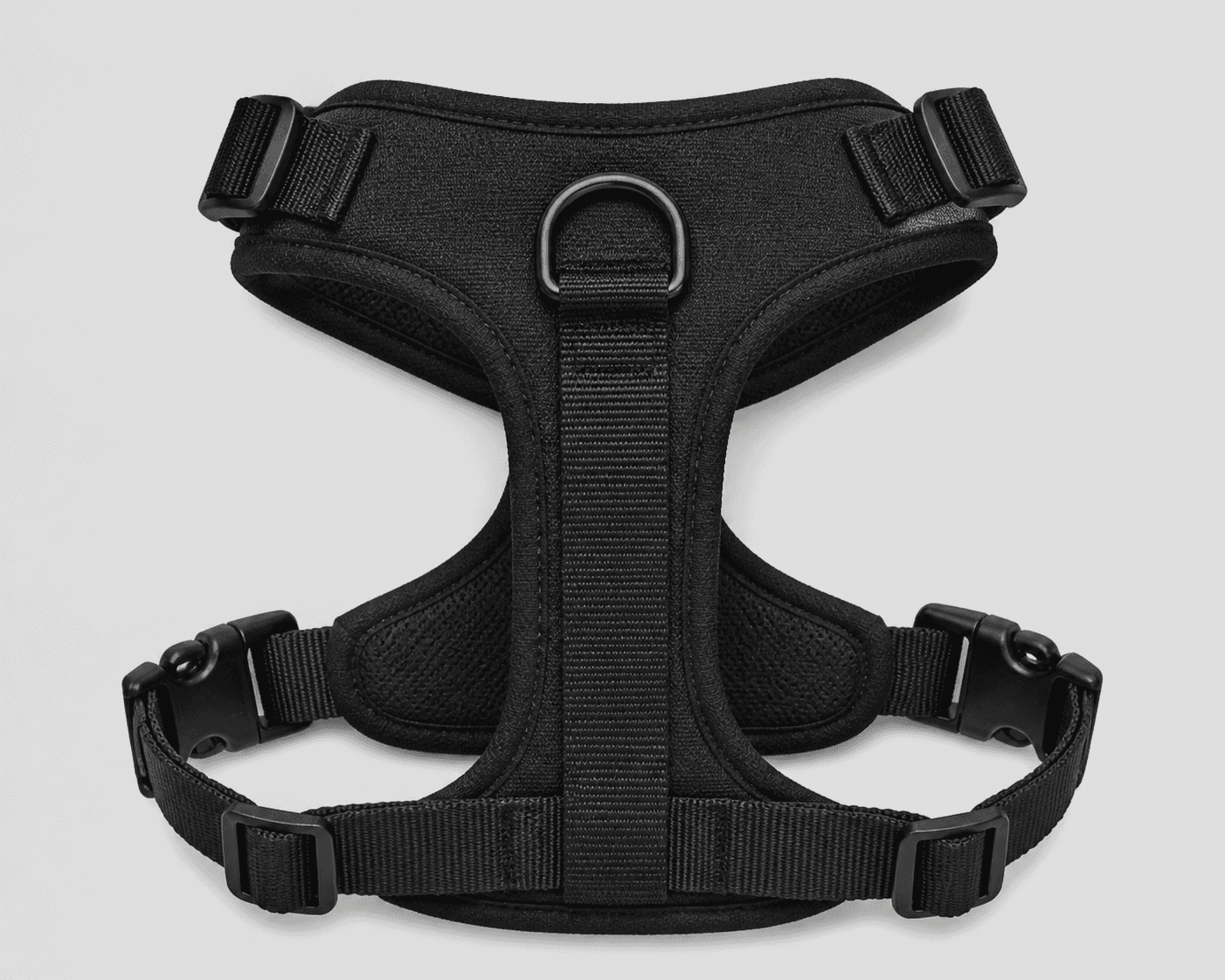
Use the supplied adjustable dog walking harness as the identity anchor, then place one complete harness on a standing dog in a quiet, lightly styled walking setting. Keep the black padded panels, webbing, upper adjusters, lower buckles, and centered back D-ring visible, with enough margin for 4:5 and 1:1 crops. In Airveek, choose product-scene, lifestyle, and social-post, then inspect the result at full size and mobile-thumbnail size before export.
Search task: How do I show this dog harness in a believable setting without hiding its scale or important details?
Written by LIKA
The buyer question
How do I show this dog harness in a believable setting without hiding its scale or important details?
Quick setup
- Goal
- Ecommerce product-page supporting image and mobile social lifestyle crop
- Output
- 4:5 portrait lifestyle frame, 1:1 centered mobile-safe crop, Largest clean export before destination-specific resizing
- Goal
- social-post
- Mode
- product-scene
- Scene
- lifestyle
Example Airveek result
How to create it
1. Add the two supplied references
Upload generic-dog-harness.png as the product reference and public/images/morrow/morrow-logo.png as the second input. Use the harness image to preserve the black appearance, padded body, webbing, side adjusters, side buckles, lower hardware, and centered back D-ring; use the logo image only for the exact lowercase morrow mark and both sparkle stars.
2. Choose the lifestyle setup
In Airveek's product-fashion creator, set Mode to product-scene, Scene to lifestyle, and Goal to social-post. Keep this job focused on believable dog-walking context and visual scale; use the clean listing sibling for flat identification and the detail sibling for close strap-and-clip inspection.
3. Build the scene around the harness
Place one standing dog in a quiet sidewalk or park-edge setting and frame the dog from a side-to-rear three-quarter angle. Keep the harness larger and sharper than the background, use the dog only as a scale cue, and keep any leash, collar, or prop out of the harness proof areas.
4. Protect the fit cues and crop
Keep the padded body, webbing paths, upper adjusters, lower buckles, lower hardware, and centered back D-ring inside the safe crop. Leave margin around the harness, separate black webbing from the coat with soft daylight and gentle fill, and avoid a pose that folds the straps over one another.
5. Compare before export
Compare the fresh result with the supplied harness and logo references at full size, in a 4:5 portrait crop, and at a 240 × 240 mobile thumbnail. Reject changed geometry or color, hidden straps or hardware, an altered morrow mark, new text, an over-styled setting, or a crop that makes the harness too small to identify. Confirm the destination's current format, pixel, and file-size requirements before resizing.
Tested prompt
Use the supplied adjustable dog walking harness reference as the identity reference and the supplied fictional morrow logo reference as the second input. Create one premium ecommerce lifestyle photo for one black adjustable dog walking harness. Preserve the exact harness geometry and visible details: broad padded body, webbing straps, two upper side adjusters, two lower side buckles, lower adjustment hardware, and centered back D-ring. Place the harness on a standing dog in a quiet neighborhood sidewalk or park-edge setting, viewed from a natural side-to-rear three-quarter angle. Keep the harness large, sharp, and unobscured, with the dog providing context and visual scale; leave margin for a 4:5 lifestyle crop and a centered 1:1 mobile crop. Use soft directional daylight with gentle fill so the black webbing and hardware separate from the dog's coat. If branding is shown, place the exact lowercase wordmark "morrow" with its two sparkle stars naturally on the harness label or a small package element. Add no other readable brand text.Recorded settings
- Goal
- social-post
- Mode
- product-scene
- Scene
- lifestyle
Common problems and fixes
Problem: The dog pose folds the straps together or hides the buckles, adjusters, or D-ring.
Fix: Use a calmer standing pose, move to a side-to-rear three-quarter angle, simplify the background, and keep the harness areas visible before adding any movement.
Problem: The black harness blends into the dog's coat or a dark background.
Fix: Use a lighter neutral coat or quiet background separation, soften the daylight with gentle fill, and keep a controlled edge highlight on the webbing without changing its color.
Problem: A leash, collar, bandana, or park prop becomes a second product hero.
Fix: Remove nonessential accessories, keep one dog and a restrained setting, and reserve any separate accessory story for another image job.
Problem: The 4:5 or square crop makes the harness too small or cuts through the proof areas.
Fix: Frame closer while preserving margin around the harness, then check both crops at mobile-thumbnail size before resizing.
Problem: The harness geometry, black appearance, or morrow mark changes from the references.
Fix: Reuse both supplied references, repeat the identity constraints, simplify the dog angle, and reject the result if the exact lowercase mark with two sparkle stars or the visible harness layout no longer matches.
What to double-check
- The supplied reference anchors the visible black appearance, harness shape, webbing, padded body, side hardware, and centered back D-ring; it does not establish size, dimensions, materials, or fit for a particular dog.
- A worn-dog lifestyle image can show placement and visual scale, but it cannot prove that an adjustable harness fits every dog or establish comfort, safety, pull control, or another product specification.
- No finished generated lifestyle frame is selected in this draft. Run a fresh logo-aware lifestyle attempt from the supplied references and compare it against the source before using a generated image in a gallery or campaign.
- Keep the lifestyle job separate from the clean listing image and close strap-and-clip detail image so the dog pose and setting do not cover the buyer-critical areas.
Why this works
The dog supplies a natural scale cue, but the harness remains the product being assessed. A calm walking setting and a closer side-to-rear angle make the padded body, webbing, adjusters, buckles, lower hardware, and centered back D-ring easier to recognize without asking one frame to prove exact fit. The clean listing sibling handles quick identification, and the detail sibling handles close strap-and-clip inspection.
Before you export
- Compare the result with the supplied harness reference: preserve the black appearance, padded body, webbing, upper adjusters, lower buckles, lower hardware, centered back D-ring, and visible strap layout.
- Use one standing dog as a natural scale cue, but keep the harness the largest and sharpest product subject in the frame.
- Keep the harness unobscured and leave margin for a 4:5 lifestyle crop and a centered 1:1 mobile crop; inspect both at thumbnail size.
- Use soft directional daylight with gentle fill so black webbing, padded panels, and hardware separate from the dog's coat without harsh glare.
- When branding is shown, use the supplied exact lowercase morrow wordmark with both sparkle stars and no other readable brand copy.
- Use the product's own sizing guide and instructions for exact fit decisions; do not infer fit, comfort, safety, or performance from the lifestyle image.
- Confirm the destination's current image format, pixel, file-size, and crop requirements before export.
Common questions
What should a dog harness lifestyle product photo show?
Show one dog wearing the harness in a believable walking context, with enough distance and light for the harness to remain the visual subject. For this reference, keep the padded body, webbing, upper adjusters, lower buckles, lower hardware, and centered back D-ring readable; use the flat listing and close-detail jobs for unobstructed inspection.
How do I show the harness's scale without hiding it?
Use the standing dog as the scale cue rather than adding a hand, leash, or busy prop across the product. Keep the dog close enough that the harness reads as one complete item, use a calm side-to-rear three-quarter angle, and leave margin for a square mobile crop so the straps and hardware do not disappear.
Can a lifestyle image prove that this harness fits every dog?
No. A worn view can show visible placement and give a sense of how the harness sits on one dog, but it cannot establish a universal fit. Check the specific product's measurements, size chart, adjustment guidance, and fit instructions for each dog's body shape, then use the image only to confirm that the advertised harness is represented accurately.
What should I check in the mobile crop?
At thumbnail size, the harness should still read as one black product on the dog, with the padded body and main strap path visible. Check that the side adjusters, lower buckles, lower hardware, and centered back D-ring are not lost to shadow, fur, pose, or cropping. If branding is shown, verify the exact lowercase morrow wordmark and both sparkle stars remain unchanged.
Further reading
- Additional image link [additional_image_link] - Google Merchant Center Help — Google Merchant Center Help
- How to Fit the PetSafe Comfort Harness on Your Pet — PetSafe Support
- How do I properly photograph complex products like a dog harness? — Reddit product-photography discussion
- Airveek: All-in-One AI Image Generator — Airveek
- Marketplace/category reference — Amazon marketplace reference
- Shopify product photography workflow — Shopify
- Image link [image_link] - Google Merchant Center Help — Google Merchant Center Help