

Airveek field guide
Yoga Mat Product Photo Prompt for Airveek
Use the supplied thick non-slip exercise mat as the identity anchor, add the supplied fictional morrow logo reference as the second input, and run three Airveek product-fashion jobs separately: a full rolled-mat listing, a partly unrolled floor scene, and a surface-and-edge detail crop. Preserve the visible color, rolled profile, ridged surface, straps, and buckle; check each frame full-size and at mobile-thumbnail scale.
Search task: yoga mat product photo prompt
Written by LIKA
The buyer question
What tested Airveek prompt can I use to create a consistent yoga mat product-photo set?
Quick setup
- Goal
- Ecommerce product-photo prompt set with a marketplace-ready primary frame and supporting gallery views
- Output
- 1:1 square-safe working crop, Around 1500x1500 pixels or above when possible for listing formats; verify the destination's current requirements, Mobile-thumbnail review before export
- cropCheck
- 1:1 square-safe working crop plus a mobile-thumbnail review
- creatorRoute
- /create/product-fashion
- detailStartingControls
- Mode: product-scene · Scene: studio · Goal: store-listing
- listingStartingControls
- Mode: product-scene · Scene: studio · Goal: store-listing
- lifestyleStartingControls
- Mode: product-scene · Scene: lifestyle · Goal: social-post
Example Airveek result
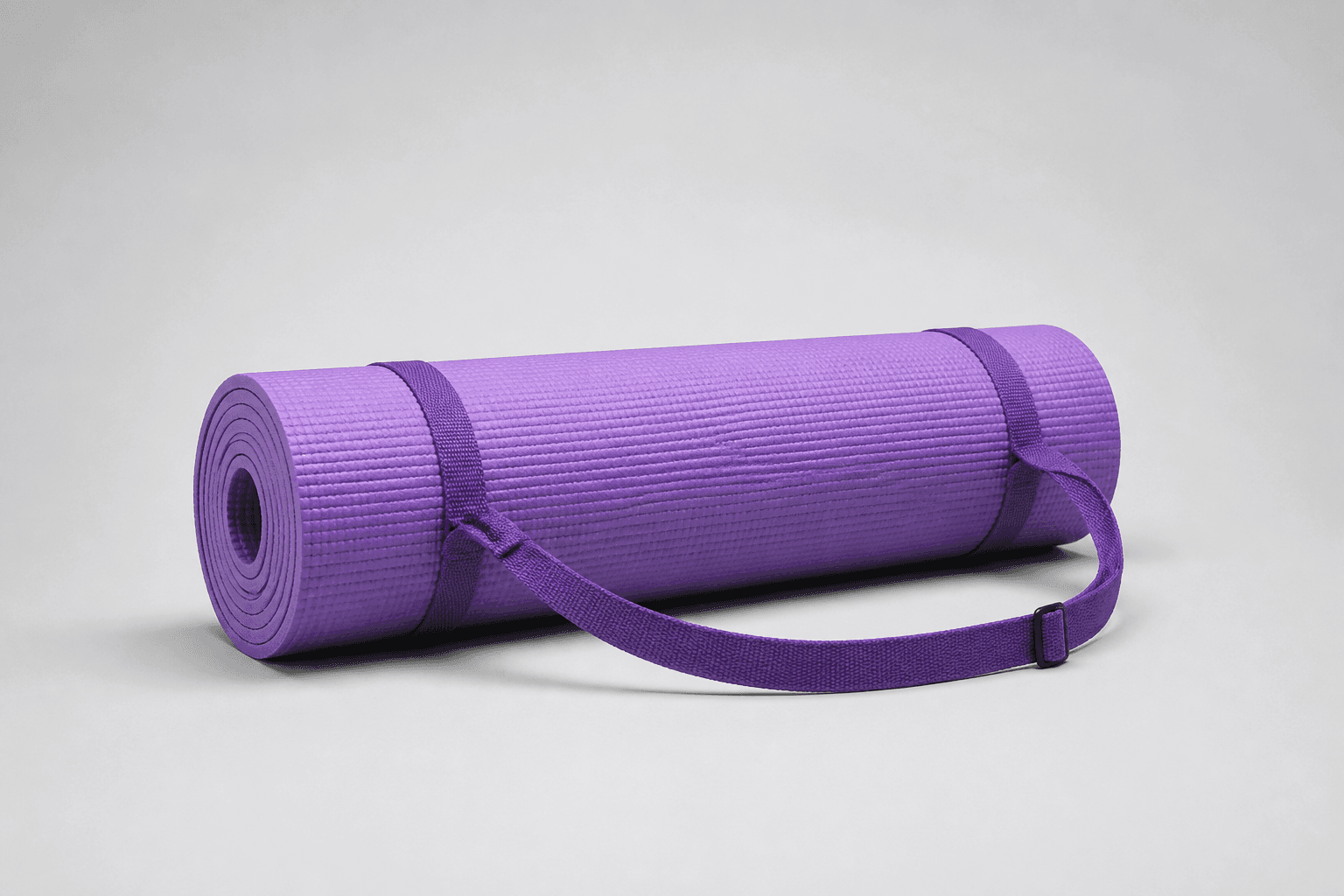
How to create it
1. Add the two supplied references
Upload the supplied yoga-mat image first. Add the supplied logo image second for the fictional demo version so Airveek can preserve the exact lowercase morrow wordmark and both sparkle stars without inventing another mark.
2. Choose one mat-photo job
Open Airveek's product-fashion creator and match the controls to the job: studio and store-listing for the clean listing, lifestyle and social-post for floor-use context, or studio and store-listing for the detail crop. Run the three blocks separately.
3. Lock the visible mat identity
Keep the supplied purple color, complete rolled silhouette, ridged surface, rolled edge profile, two straps, buckle, geometry, and material appearance aligned with the reference. Change the scene and crop, not the product.
4. Paste the matching prompt block
Use the listing block for full product identification, the lifestyle block for a partly unrolled floor relationship, and the detail block for surface and rolled-edge inspection. Keep the supplied logo reference with the same prompt set when the fictional brand mark is shown.
5. Review full size and mobile scale
Compare each fresh result with the supplied mat at full size, in its intended crop, and at a small mobile thumbnail. Confirm that the rolled edge, ridged surface, straps, buckle, color, and exact morrow mark remain consistent, and reject any result that hides or changes them.
6. Keep the largest useful export
Retain the largest useful file until the destination's current image and metadata requirements are confirmed. Use the clean rolled frame as the primary product view, then keep the partly unrolled and close surface-and-edge jobs as supporting images.
Tested prompt
Use the supplied thick non-slip exercise mat reference and the supplied fictional morrow logo reference as the only inputs. Apply the exact lowercase wordmark "morrow" with its two sparkle stars naturally to the mat's product surface, strap label, or package element; preserve the supplied mark without inventing other words.

LISTING PROMPT
Create one clean product-first listing photo for one thick non-slip exercise mat. Keep the supplied mat's visible purple color, complete rolled silhouette, ridged surface, rolled edge profile, two straps, and buckle unchanged. Use a quiet neutral studio background, soft controlled commercial light, a clear hero product, and enough margin for a 1:1 crop. Keep the full mat and its buyer-visible details sharp and unobscured. Do not add another mat, extra accessories, invented dimensions, measured thickness, grip or performance claims, watermarks, retailer marks, promotional overlays, borders, or any other readable text.

LIFESTYLE PROMPT
Create one believable product-photo lifestyle frame for the same thick non-slip exercise mat. Place the unchanged mat partly unrolled on a quiet, sunlit studio floor with one restrained human-use cue at the edge of the frame so the surface and apparent floor relationship are easy to understand. Keep most of the mat visible, including its rolled portion, ridged surface, edge profile, straps, and buckle; keep the product dominant and easy to crop for mobile. Do not add another mat, competing products, invented dimensions, measured thickness, grip or performance claims, watermarks, retailer marks, promotional overlays, or any other readable text.

DETAIL PROMPT
Create one close-up ecommerce detail photo for the same thick non-slip exercise mat. Show the ridged surface and rolled side edge clearly in a square-safe crop, with one strap and buckle included when they remain naturally in frame. Use controlled side or diffused commercial light so the texture reads without glare. Keep the exact visible product identity, purple color, geometry, edge profile, straps, and buckle unchanged. Do not invent dimensions, material composition, grip performance, care instructions, features, claims, extra products, watermarks, retailer marks, promotional overlays, or any other readable text.Recorded settings
- cropCheck
- 1:1 square-safe working crop plus a mobile-thumbnail review
- creatorRoute
- /create/product-fashion
- detailStartingControls
- Mode: product-scene · Scene: studio · Goal: store-listing
- listingStartingControls
- Mode: product-scene · Scene: studio · Goal: store-listing
- lifestyleStartingControls
- Mode: product-scene · Scene: lifestyle · Goal: social-post
Common problems and fixes
Problem: The mat changes color, shape, surface, strap placement, or buckle.
Fix: Re-upload the mat and logo references, repeat the visible identity cues, and rerun the affected block. Reject any result that no longer matches the supplied reference.
Problem: The rolled edge or ridged surface disappears in the floor scene.
Fix: Pull the camera back or change the angle so the rolled portion and surface remain visible, reduce styling, and move close proof to the detail block.
Problem: The lifestyle cue covers too much of the mat or makes it feel like a generic workout image.
Fix: Keep one restrained human-use cue at the frame edge, simplify the floor, keep the mat dominant, and use the clean listing for unobstructed identification.
Problem: The supplied mark becomes a floating overlay or extra words appear.
Fix: Keep the supplied logo as the second input, preserve the exact lowercase morrow wordmark and both sparkle stars on the mat, strap label, or package element, and remove every other readable mark.
Problem: The square crop or mobile thumbnail loses the rolled edge, straps, or buckle.
Fix: Reduce props, pull back slightly, leave square-safe margin around the complete product, and check the centered thumbnail before export.
Problem: The image implies measured thickness, roll-up size, or non-slip performance.
Fix: Remove rulers, badges, labels, and unsupported copy. Keep the visible edge and surface as visual cues, and tie measurements and performance to verified product information.
What to double-check
- The supplied reference supports visible appearance cues only: purple color, rolled silhouette, ridged surface, rolled edge, straps, and buckle. It does not establish measured thickness, exact dimensions, material composition, roll-up size, or non-slip performance.
- The available ECO16 recording confirms the product-fashion route and studio/store-listing control sequence, but it used one older combined capture without the current logo input or independent job labels. Run the three current blocks separately with both references before treating new results as a finished set.
- A partly unrolled floor scene can provide context and apparent scale, but it is not a measurement. Use verified product information for thickness, dimensions, roll-up size, material, care, and performance details.
- Keep the largest useful export and confirm the destination's current image, metadata, variant, and generated-image requirements before use.
Why this works
The prompt fixes one mat identity and gives each image one buyer job: identify the complete rolled product, show how the mat relates to a floor in a restrained use scene, or enlarge the ridged surface and rolled edge. Repeating the purple color, rolled profile, straps, and buckle across the three blocks creates a consistent set, while separate crops keep the main frame readable and stop context from replacing product proof.
Before you export
- Use the same supplied mat reference and supplied morrow logo reference in every job.
- Keep the purple color, rolled silhouette, ridged surface, rolled edge, two straps, and buckle consistent across the set.
- Give each block one job: complete product identification, partly unrolled floor context, or close surface-and-edge inspection.
- Keep the exact lowercase morrow wordmark and its two sparkle stars unchanged, with no other readable brand text.
- Leave enough margin for a 1:1 crop, then review the full image, intended crop, and a centered mobile thumbnail.
- Verify thickness, dimensions, roll-up size, materials, non-slip performance, care, and other specifications from product information rather than from the image.
Common questions
Why use three prompt blocks for one yoga mat?
Each block answers a different shopper question. The listing frame identifies the complete rolled mat, the lifestyle frame adds restrained floor-use context, and the detail frame enlarges the ridged surface and rolled edge. Running them separately keeps a pose or close crop from weakening the main product view.
Which yoga mat details should stay consistent across the set?
Keep the supplied purple color, complete rolled silhouette, ridged surface, rolled edge profile, two straps, buckle, geometry, and material appearance aligned with the reference. Change the scene, light, and crop for each job, not the product identity.
Should the main yoga mat image show it rolled or in use?
Use the complete rolled view for the primary product-identification frame, then add a separate partly unrolled floor scene for context and a close surface-and-edge view for detail. This lets the main image stay clear while the supporting jobs answer use and texture questions.
Can a yoga mat photo prove thickness or non-slip grip?
A photo can make the rolled edge and ridged surface easier to inspect, but it cannot establish measured thickness, roll-up size, material composition, or grip performance. Keep those details tied to verified product information and use the image to preserve visible product identity.
Where should the fictional morrow mark go?
Add the supplied logo reference as the second input and preserve the exact lowercase morrow wordmark with its two sparkle stars on a small mat label, strap label, package element, or product surface. Keep every other readable brand text out of the frame, then inspect the mark at full size and mobile scale.
Further reading
- Image link [image_link] | Google Merchant Center Help — Google Merchant Center Help
- The Complete Guide to Ecommerce Photography — Shopify
- Airveek product-fashion workflow — Airveek
- Marketplace/category reference — Amazon marketplace reference