

Airveek field guide
Carry-On Luggage Lifestyle Product Photo: Show Scale and Details
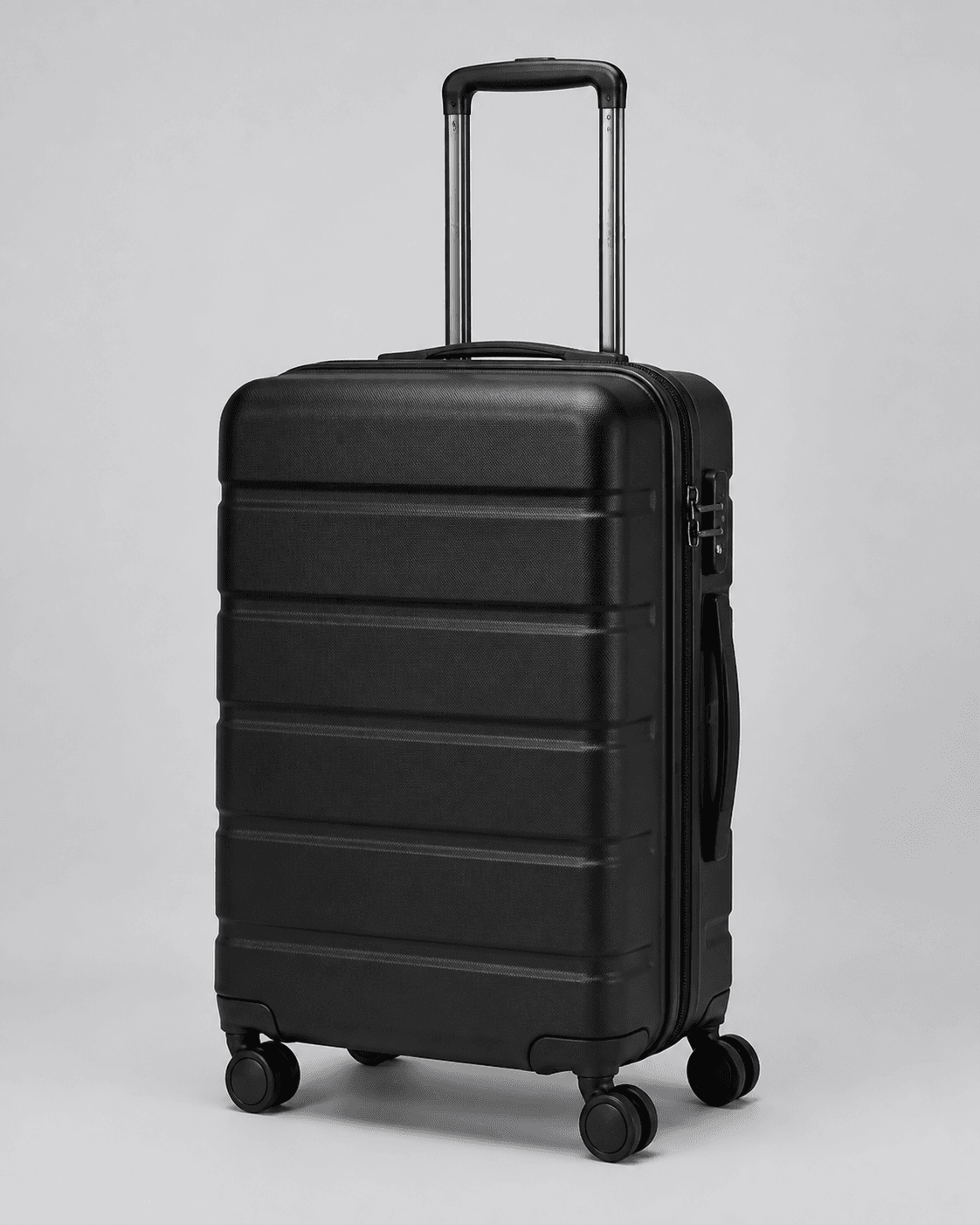
Use the supplied hard-shell spinner carry-on as the identity anchor, then place one complete suitcase upright in a bright, quiet airport-lounge scene. Keep the wheels, telescoping handle, shell ribs, zipper edge, and side handle visible, leave floor margin for scale, and protect the product with a three-quarter camera angle, soft side light, and a square-safe crop. Use separate detail imagery for the opening or interior unless a matching reference supports it.
Search task: carry-on luggage lifestyle product photo
Written by LIKA
The buyer question
How do I show this carry-on luggage in a believable setting without hiding its scale or important details?
Quick setup
- Goal
- Ecommerce gallery lifestyle/supporting image
- Output
- 1:1 square-safe lifestyle crop, 240 x 240 mobile-thumbnail check, 1500 x 1500 preferred square master when supported
- Crop
- 1:1 square-safe crop with the complete suitcase, wheels, handle, and shell inside the center-safe area
- Goal
- social-post
- Mode
- product-scene
- Scene
- lifestyle
- Export
- Keep the largest clean master; use 1500 x 1500 when supported and confirm current destination rules before resizing
- Lighting
- Soft daylight-style side light with gentle fill and a restrained floor shadow
- Mobile check
- 240 x 240 thumbnail
- Detail visibility
- Keep wheel assemblies, handle rails, shell ribs, zipper edge, and side carry handle readable; show the opening or interior only when separately supported
Example Airveek result
How to create it
1. Add the two supplied references
Upload the luggage image as the identity anchor and add the supplied fictional demo-brand logo reference as the second input. Preserve the exact lowercase morrow wordmark and both sparkle stars when branding is shown, with no other readable brand text.
2. Choose the lifestyle setup
Open Airveek's product-fashion creator at /create/product-fashion. Set Mode to product-scene, Scene to lifestyle, and Goal to social-post so this frame focuses on believable travel context and visual scale.
3. Give the scene one travel job
Ask for a bright, quiet airport lounge with the same suitcase upright on a clean floor. Keep the architecture restrained, remove other luggage and readable signs, and make the carry-on the clear visual subject.
4. Protect the scale cue
Use a low three-quarter camera angle with the complete suitcase visible. Leave floor margin below the wheels and breathing room above the handle so the product reads at a glance and survives a square crop.
5. Light for shell and hardware
Use soft daylight-style side light with gentle fill and a restrained floor shadow. Keep the black shell ribs, zipper edge, handle rails, side handle, and wheel assemblies distinct without hard reflections or deep shadows.
6. Keep the product details honest
Compare the frame with the supplied reference and keep the visible shell shape, ribs, finish, handles, zipper edge, and wheels consistent. Show the opening or interior only when a matching supplied interior view supports it.
7. Check the mobile crop
Review the image full size, in the intended square crop, and at 240 x 240. Confirm that the full suitcase, wheels, handle, shell detail, scale cue, and exact morrow mark remain clear when branding is shown.
8. Pair context with proof
Use this lifestyle frame for airport context and visual scale. Pair it with the clean listing sibling for complete-product identification and the detail sibling for wheels, handle, zipper, and any supported opening view.
9. Export for the destination
Keep the largest clean master until the destination's current image rules are confirmed. Preserve a square-safe version, use 1500 x 1500 when supported, and resize only after the crop and mobile check still keep the carry-on easy to find.
Tested prompt
Use the supplied hard-shell spinner carry-on reference as the identity anchor and the supplied fictional demo-brand logo reference as the second input. Create one ecommerce lifestyle product photo in a bright, quiet airport lounge with the same suitcase upright on a clean floor. Preserve the exact black hard-shell shape, horizontal shell ribs, telescoping handle rails, side carry handle, zipper edge, wheel assemblies, finish, and proportions. Keep one suitcase dominant, leave clear floor margin beneath the wheels and open space above the handle for scale and a square-safe mobile crop, and use a low three-quarter camera angle with soft daylight-style side light and a restrained floor shadow. Keep airport architecture quiet and free of readable signs; add no other luggage or competing product. Apply the exact lowercase wordmark "morrow" with both sparkle stars naturally to the product label, package, or product surface when branding is shown, and use no other readable brand text. Show the opening or interior only when a matching supplied interior reference supports it. Do not invent dimensions, packing capacity, airline acceptance, wheel performance, durability, materials, claims, extra products, watermarks, retailer logos, or promotional overlays.Recorded settings
- Crop
- 1:1 square-safe crop with the complete suitcase, wheels, handle, and shell inside the center-safe area
- Goal
- social-post
- Mode
- product-scene
- Scene
- lifestyle
- Export
- Keep the largest clean master; use 1500 x 1500 when supported and confirm current destination rules before resizing
- Lighting
- Soft daylight-style side light with gentle fill and a restrained floor shadow
- Mobile check
- 240 x 240 thumbnail
- Detail visibility
- Keep wheel assemblies, handle rails, shell ribs, zipper edge, and side carry handle readable; show the opening or interior only when separately supported
Common problems and fixes
Problem: The wheels disappear at the bottom of the frame or in the mobile thumbnail.
Fix: Lower the camera slightly, leave more floor margin beneath the suitcase, keep the wheel assemblies against a gently contrasting floor, and retest the square crop at 240 x 240.
Problem: The telescoping handle is clipped or blends into the lounge background.
Fix: Pull back enough to keep open space above the handle, quiet the background behind it, and use soft side light so the rails separate without a bright reflection.
Problem: The airport setting overwhelms the carry-on.
Fix: Remove extra luggage and busy signage, reduce the scene to quiet architecture and clean floor, and move the camera closer while keeping the entire suitcase visible.
Problem: The luggage looks like a different suitcase after staging.
Fix: Reuse the supplied reference, compare the shell ribs, finish, handle rails, zipper edge, side handle, wheels, and proportions beside the result, and keep the scene change separate from the product identity.
Problem: The travel context implies a measured size or airline acceptance.
Fix: Treat the floor and lounge as visual context only. Remove rulers, badges, airline signage, and unsupported copy, then use verified product information for exact dimensions, capacity, and fit.
Problem: The demo-brand version rewrites the mark or adds extra words.
Fix: Use the supplied logo reference as the second input, preserve the exact lowercase morrow wordmark and both sparkle stars, and remove every other readable brand word or overlay.
Problem: The image invents an interior layout or packing space.
Fix: Keep the lifestyle frame exterior-only unless a matching interior reference is supplied. Move opening and packing-space proof to a separate supported detail view.
What to double-check
- The supplied reference is exterior-only, so it anchors the shell, finish, handles, zipper edge, and wheel assemblies but does not establish the interior layout or packing capacity.
- An airport-lounge scene provides context and an apparent scale cue; use verified product information for exact dimensions, capacity, fit, or airline decisions.
- A lifestyle image cannot prove wheel performance, lock strength, durability, material composition, or another property that is not visibly supported by the product reference.
- No matching logo-aware Airveek lifestyle result is attached yet; keep the supplied reference as the identity anchor until a fresh result is recorded, compared, and reviewed.
- For Merchant Center exports, keep a stable HTTPS image URL and confirm the destination's current format, size, crop, and staging rules before final delivery.
Why this works
A carry-on luggage lifestyle image has one clear job: show the product in a believable travel setting while giving the shopper a visual sense of scale. A low three-quarter view keeps the complete suitcase, wheels, handle, shell, and zipper edge easy to find, while soft side light protects the black finish and hardware. The clean listing sibling can handle fast identification, and the detail sibling can handle the opening or interior only when a matching reference supports it.
Before you export
- Leave breathing room below the wheels and above the handle so the full product survives a square crop and remains readable at 240 x 240.
- Use soft side light and gentle fill to reveal black shell texture and hardware without hard glare or crushed shadows.
- When branding is shown, use only the supplied exact lowercase morrow wordmark with both sparkle stars and no other readable brand text.
- Show the opening or interior only when a matching supplied reference supports it; keep exact packing, size, and fit claims in verified product information.
- Keep the largest clean master, then confirm the destination's current image requirements before resizing or publishing.
Common questions
How do I show this carry-on luggage in a believable setting without hiding its scale or important details?
Use one bright, quiet airport-lounge scene with the complete carry-on upright on a clean floor. A low three-quarter angle, clear space below the wheels, and open space above the handle keep the suitcase easy to identify while the floor and restrained architecture provide context. Keep signs, extra luggage, and props away from the shell, wheels, and handle.
Which details should a carry-on luggage lifestyle product photo show first?
Keep the full shell, wheel assemblies, telescoping handle, side carry handle, and zipper edge readable while the image establishes travel context and visual scale. Let a separate close view handle the opening or interior only when a matching product reference supports it; do not force every proof point into the lifestyle frame.
Can a lifestyle luggage photo prove exact size, packing capacity, or airline acceptance?
No. The scene can provide an apparent scale cue, but it cannot establish measured dimensions, packing capacity, airline acceptance, wheel performance, or durability. Keep those decisions tied to verified information for the exact carry-on shown, and use the image for visible context only.
Should I use a clean background or a lifestyle scene for carry-on luggage?
Use both for different jobs. A clean full-product frame makes identification quick, while a quiet airport scene helps shoppers imagine the carry-on in context and judge its apparent scale. Keep the same shell, finish, handles, wheels, and proportions across the set so the supporting image still represents the product being sold.
How should the supplied morrow mark appear in the fictional demo version?
When branding is shown, use the supplied logo reference as the second input and place the exact lowercase morrow wordmark with both sparkle stars naturally on a product surface, label, or package. Keep the mark together and keep every other readable brand word, retailer mark, or promotional overlay out of the frame.
Further reading
- Image link [image_link] - Google Merchant Center Help — Google Merchant Center Help
- The Complete Guide to Ecommerce Photography — Shopify
- Marketplace/category reference — Amazon marketplace reference